



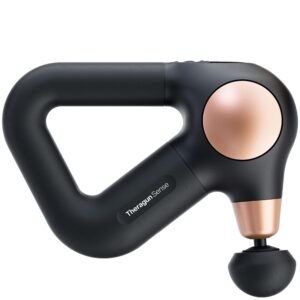
Therabody Theragun Sense 2nd Generation
$25.96
1. Pick up and hold the device. Slide your hand into the ergonomically designed Theragun triangle handle. Our patented Theragun triangle multi-grip handle design is three-sided, so you can hold the device from any side in a variety of ways, making it easier than ever to treat hard-to-reach areas like your back without strain on your hands, wrists, and forearms.
2. Turn on your device. To turn on your device, firmly press and hold the center button on the device. The device’s LCD screen will light up when the device is on.
3. Select a treatment. Select “Quick Start” to begin using the device without a guided routine, or toggle through preset guided treatment routines using the up and down buttons and press the center button to select a treatment routine. Follow the preset treatment as the device guides you to move between muscle groups. The treatment used during your last session will be the default treatment for your next session.
4. Swap out built-in routines. Through the Therabody app, download guided routines to your device to easily follow along. Swap routines in and out depending on your unique needs.
5. Choose your treatment speed. Once your desired treatment is selected, toggle through the five speed options by pressing the up and down buttons to increase or decrease treatment speed, respectively.
6. Use the device. Move the device across the areas in need of treatment, gradually applying light to moderate pressure as needed. The pressure will appear on the LCD display momentarily when pressure is applied from the device to your body, with one bar indicating light pressure is being applied and three bars indicating deep pressure is being applied. Do not start by putting pressure directly on an area of discomfort. Instead, work slowly around the area to reduce tension.
7. Modify your treatment. Press the center button to pause your treatment. You can skip a treatment step by selecting the skip option, exit the treatment by selecting the exit option [X], or resume treatment by short pressing the center button.
8. Turn off the device. To turn off the device, firmly press and hold the center button. The device will automatically shut off if use is not detected on the home screen for 3 or more minutes, the device is paused for 10 or more minutes, or continuous percussive treatment lasts for 15 or more minutes.
9. Lock the device. When not in use or during transport, lock the device to prevent turning it on accidentally. Quickly press the center button three times to initiate the lock function. Quickly press the button three times again to unlock.
Related products


Beauty Tools & Skin Care Devices
Beauty Tools & Skin Care Devices


Beauty Tools & Skin Care Devices


Beauty Tools & Skin Care Devices


Beauty Tools & Skin Care Devices


Beauty Tools & Skin Care Devices


Beauty Tools & Skin Care Devices


Beauty Tools & Skin Care Devices
ORA Electric Microneedle Roller Derma Pen Replacement Heads – 10 Heads Kit (For CORDED version only)